
What's going on everybody, it's Coach Anderson. First off — thank you for choosing to serve our country. Whether you're Army, Navy, Air Force, Marines, Coast Guard, or Space Force, the fact that you're here preparing tells me you're taking this seriously. I respect that.
I built this practice test so you can see exactly where you stand before test day. No guessing. No surprises. Just the truth about your readiness — and a clear picture of what to work on.
In this guide, I'll walk you through:
- What's included in the practice test
- How to approach it the right way
- Understanding your dashboard
- What standard scores actually mean
- How to unlock your AFQT percentile and GT score
- Sending your results to your recruiter
What's Included
The AFQT Practice Test covers 5 subtests with 75 total questions. Here's the breakdown:
| Subtest | Questions | Time | Counts Toward |
|---|---|---|---|
| Arithmetic Reasoning (AR) | 16 | 39 min | AFQT + GT |
| Mathematics Knowledge (MK) | 16 | 20 min | AFQT |
| Word Knowledge (WK) | 16 | 8 min | AFQT + GT |
| Paragraph Comprehension (PC) | 11 | 22 min | AFQT + GT |
| General Science (GS) | 16 | 8 min | Bonus |
The first four — AR, MK, WK, and PC — make up your AFQT score, which is the number your recruiter uses to determine your eligibility. GS is a bonus subtest that contributes to other composite scores but does not count toward your AFQT.
You can take each subtest independently and at your own pace. You don't have to do all 5 in one sitting.
Take It Seriously
Here's where I need to keep it real with you.
Take this practice test like it's the real thing. Don't use a calculator. Don't use notes. Don't Google answers. Just sit down, focus, and do your best with what you know right now.
Why? Because the whole point is to see where you actually stand — not where you stand with help. If you cheat the practice test, the only person you're cheating is yourself. You'll walk into MEPS thinking you're ready when you're not.
I only recommend taking practice tests when you're ready to see where you are in your study. Practice tests show you where you are — they don't show you how to improve from where you are. That's what the courses, the classes, and the study guides are for.
Trust your training up to this point. Whatever you get, that's your starting line. We'll work from there.
Understanding Your Dashboard
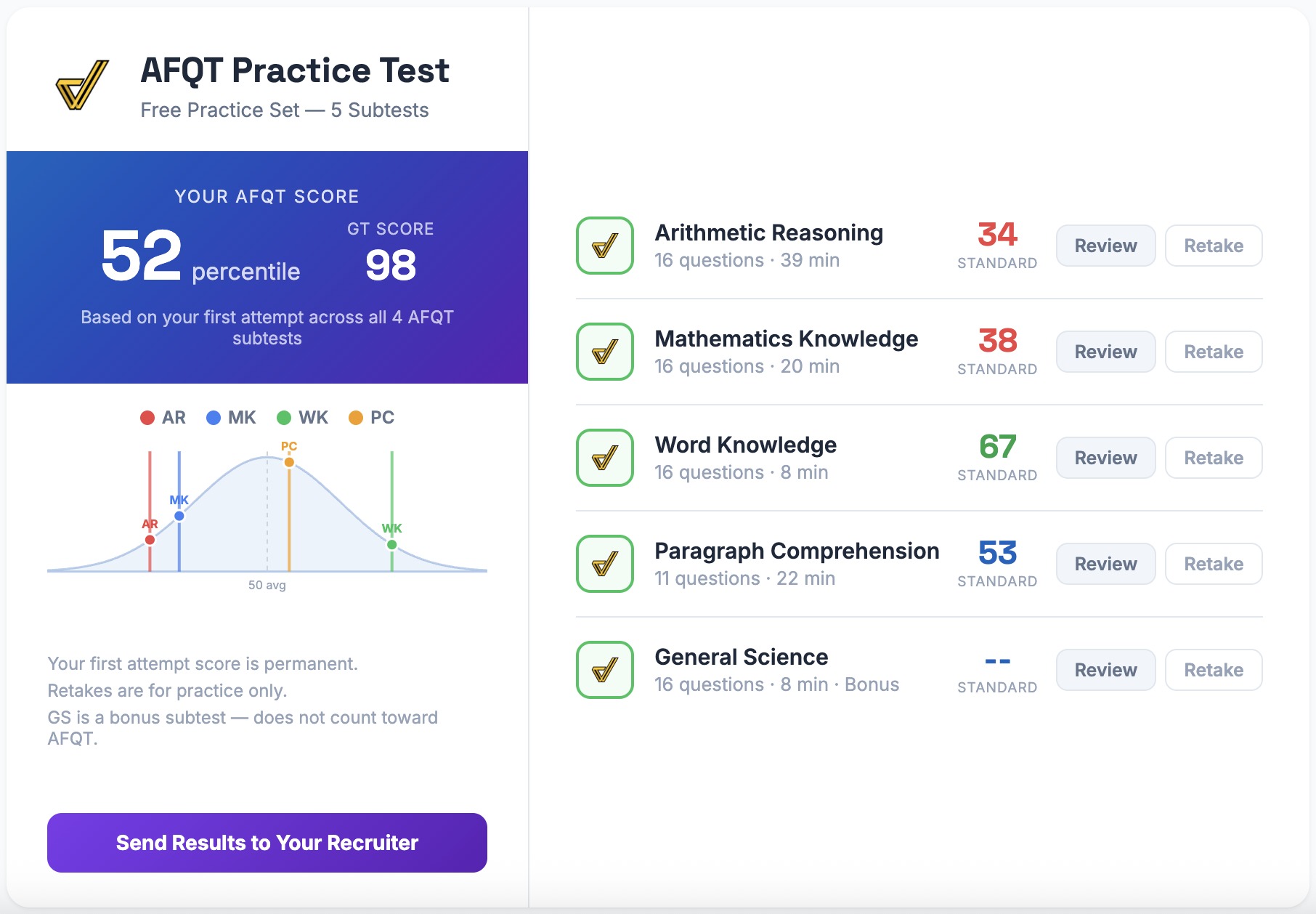
Once you've completed all 4 AFQT subtests, your dashboard will look like this:
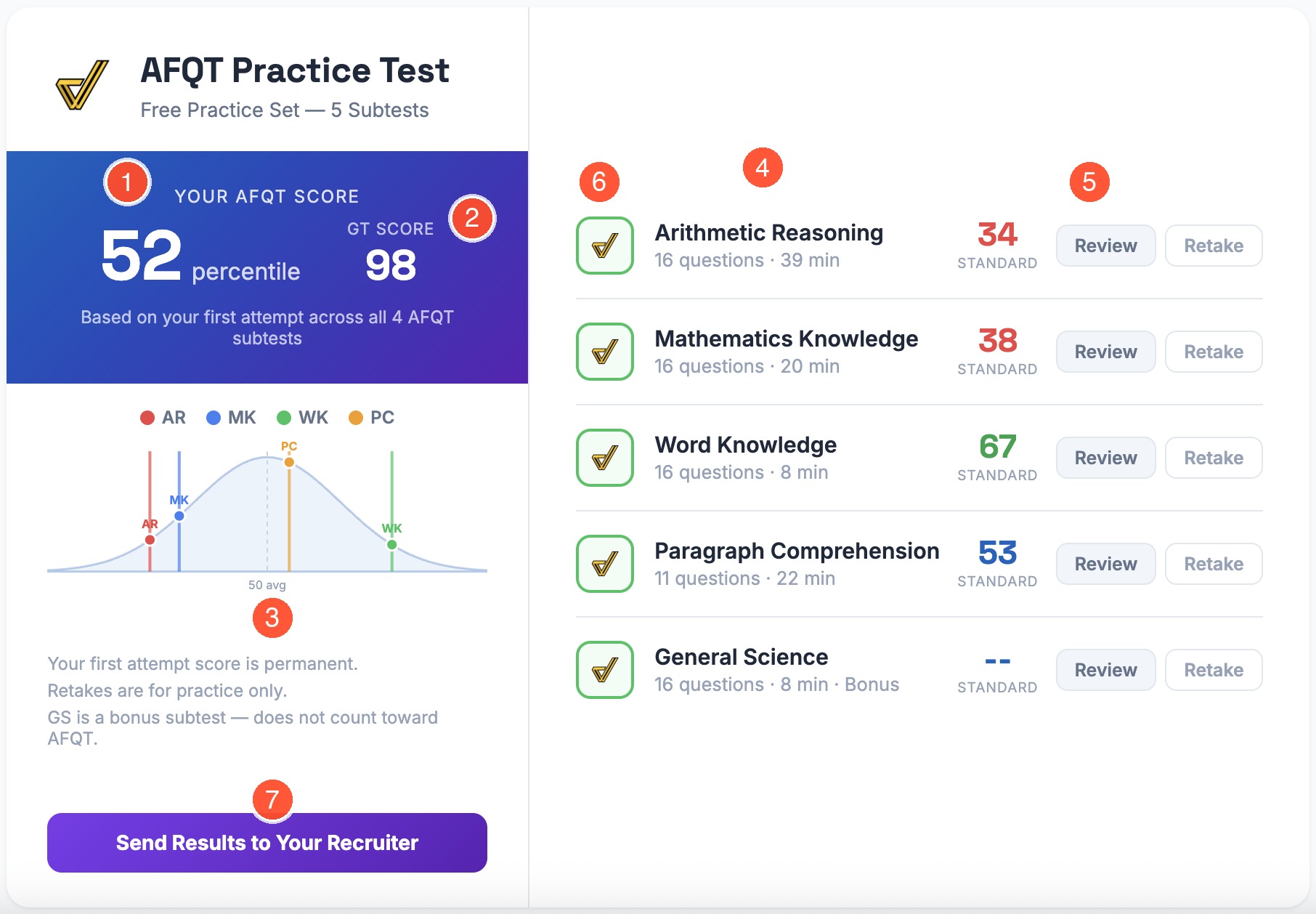
Here's what each number represents:
- Your AFQT Percentile — This is the big one. Your AFQT score is a percentile ranking from 1-99 that tells you how you performed compared to other test-takers. This is the number your recruiter cares about most. Learn more about AFQT score requirements by branch.
- Your GT Score — The General Technical score is calculated from your AR, WK, and PC standard scores. Most technical and leadership MOS positions require a GT score of 100-110 or higher. Here's how to raise your GT score.
- The Bell Curve — This shows where each of your subtest scores falls on a normal distribution. The average is 50. You can toggle each subject on and off with the checkboxes and hover over the markers to see exact scores. Before you complete all 4 subtests, this section is blurred — it unlocks when your AFQT score is calculated.
- Standard Scores — Each subtest gets a standard score (more on what this means below). These are displayed next to each subject on the right side of your dashboard.
- Review & Retake — After completing a subtest, you can Review every question with video walkthroughs (AR, MK, PC) or detailed written explanations (WK, GS). You can also Retake any subtest for extra practice — but only your first attempt counts toward your AFQT score.
- Completion Status — Each completed subtest shows our logo in a green badge. Subtests you haven't started yet show the abbreviation (AR, MK, etc.) with a Start button.
- Send Results to Your Recruiter — Once all 4 AFQT subtests are complete, this button appears so you can share your score report directly with your recruiter. More on this below.
What Standard Scores Actually Mean
Here's where people get confused, so let me break it down simply.
Your raw score is just how many questions you got right. If you got 10 out of 16 on Arithmetic Reasoning, your raw score is 10/16.
But your standard score is different. It tells you how your performance compares to the general population who took the same test. The average standard score is 50, and most people fall between 30 and 70.
Here's the part that trips people up: a high raw score doesn't always mean a high standard score, and a low raw score doesn't always mean a low standard score.
Why? Because it depends on how hard the test set is. If a test set is "easier," then the average scores are higher — so getting 12 out of 16 might only put you at average. If a test set is harder, getting 8 out of 16 might put you above average because most people scored even lower.
Think of it like this: if everyone in the room scores 90% on a test, then scoring 90% doesn't make you stand out. But if everyone else scores 50% and you score 70%, you're well above average — even though 70% "sounds" lower.
Bottom line: Don't stress about the raw number. Look at your standard score — that's the real indicator of where you stand compared to everyone else.
How to Unlock Your AFQT Percentile and GT Score
Your AFQT score is calculated from your first attempt across all 4 AFQT subtests: AR, MK, WK, and PC. You can take them in any order, but you need to complete all four before the system calculates your percentile.
Once all 4 are done:
- Your AFQT percentile appears in the blue banner on the left
- Your GT score appears next to it
- The bell curve unlocks showing all your scores visually
- Your standard scores for each subject get color-coded (green for strong, red for needs work)
- The Send Results to Your Recruiter button appears
Important: Your first attempt score is permanent. Retakes are for practice only — they won't change your AFQT percentile or GT score. So make that first attempt count.
GS (General Science) is a bonus subtest. It does not count toward your AFQT score, but it does contribute to other military composite scores. Take it if you want the full picture.
Sending Your Results to Your Recruiter
Once you've completed all 4 AFQT subtests, you'll see the "Send Results to Your Recruiter" button at the bottom of your dashboard.
Here's how it works:
- Click the button
- Enter your recruiter's email address
- Confirm the email (type it again)
- Hit send
Your recruiter will receive a professional score report showing your AFQT percentile, GT score, and standard scores for each subtest — along with the date you completed each one. You'll also get a copy of the email for your records.
What if my recruiter isn't in the system? No problem. We'll send them a quick email asking them to verify their recruiting station. Once they're verified, your score report gets delivered automatically. They don't need to do anything complicated — just verify their .mil email and they're good.
You can send your results to multiple recruiters if you're talking to more than one. Just fill out the form for each one.
And stay tuned: we'll be running giveaways for recruiters you share your scores with. Check your email in the coming weeks for details.
Ready?
You've got everything you need. The practice test is free, the solutions are included, and now you know exactly how it all works.
Thank you for choosing to serve. Let's find out where you stand.