End of Year Special — All seats valid through Dec 31, 2026. Offer expires June 5th.

ASVAB Prep for JROTC Programs

Give Your Students the Tools to Succeed

A complete ASVAB AFQT preparation platform with teacher accountability tools, progress tracking, and professional reports — built for school districts.


Army JROTC Navy JROTC Air Force JROTC Marines JROTC Coast Guard JROTC Space Force JROTC
6 Digital Courses
2,000+ Practice Questions
500+ Class Recordings
Live Teacher Dashboard

Built for Accountability

Your teachers get real-time visibility into every student's progress. No more guessing who's practicing and who's not.

Teacher Dashboard
See who's active, who needs attention, and AFQT completion rates at a glance. Sort and filter by classroom, school, or engagement level.
Assign Work, Track Completion
Assign specific lessons, goals, or practice tests to individual students or entire classrooms. The system checks completion automatically every 60 seconds.
Professional PDF Reports
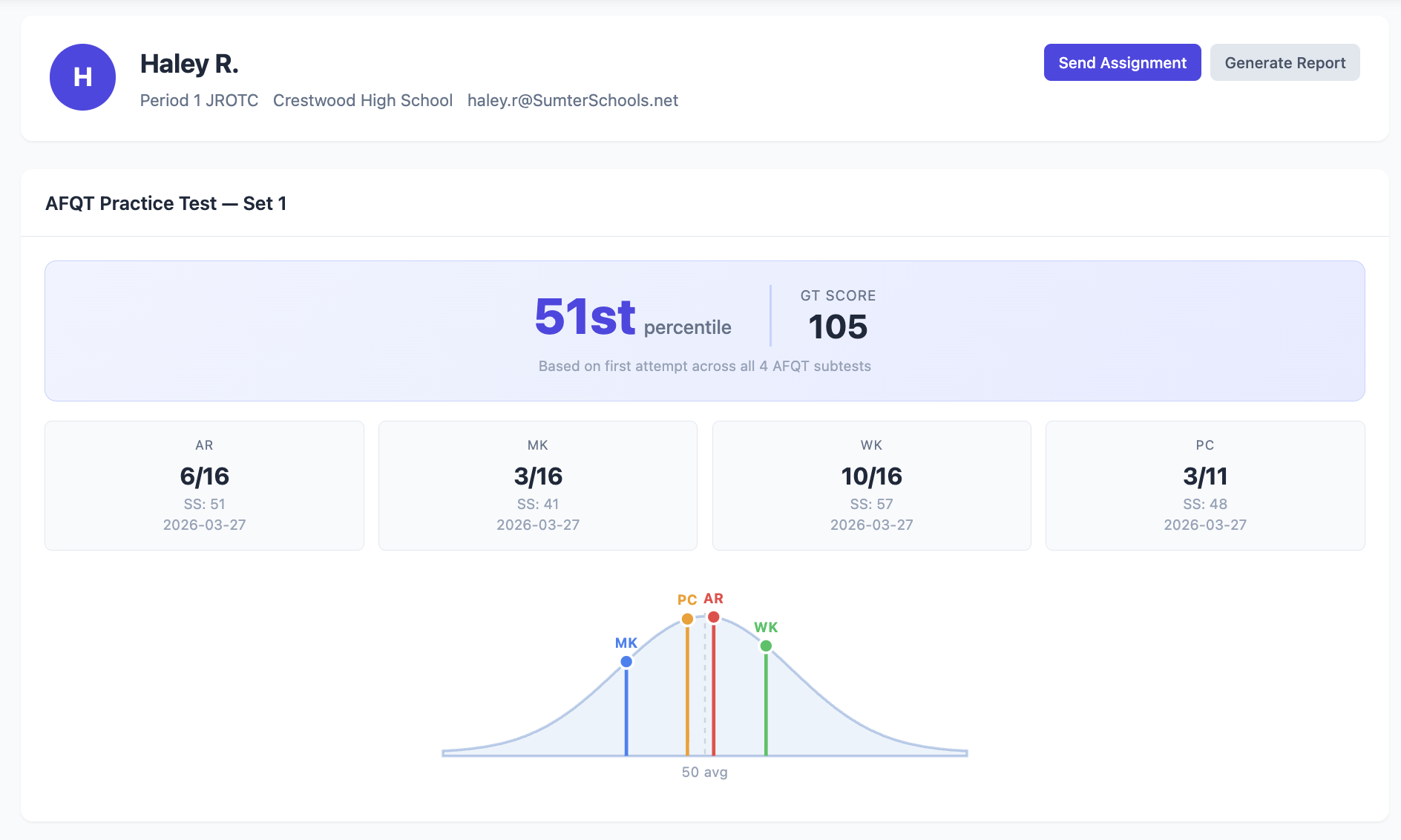
Download individual student reports with AFQT bell curves, or cohort reports for your classroom or school. One click, ready for parent conferences or admin.
Bulk Enrollment
Upload a CSV or Excel file with your student roster. Each student gets an email, clicks a link, and they're in — full access activated instantly.
AFQT Practice Testing
Students take a full AFQT practice test (AR + MK + WK + PC) and see their estimated percentile and GT score. You see the results on your dashboard.
Live Classes + 500+ Recordings
Students can join live Zoom classes with Coach Anderson or watch from a library of 500+ recorded sessions covering AR, MK, WK, and PC.

See What Teachers See

Your staff dashboard gives you everything you need to monitor progress and hold students accountable.
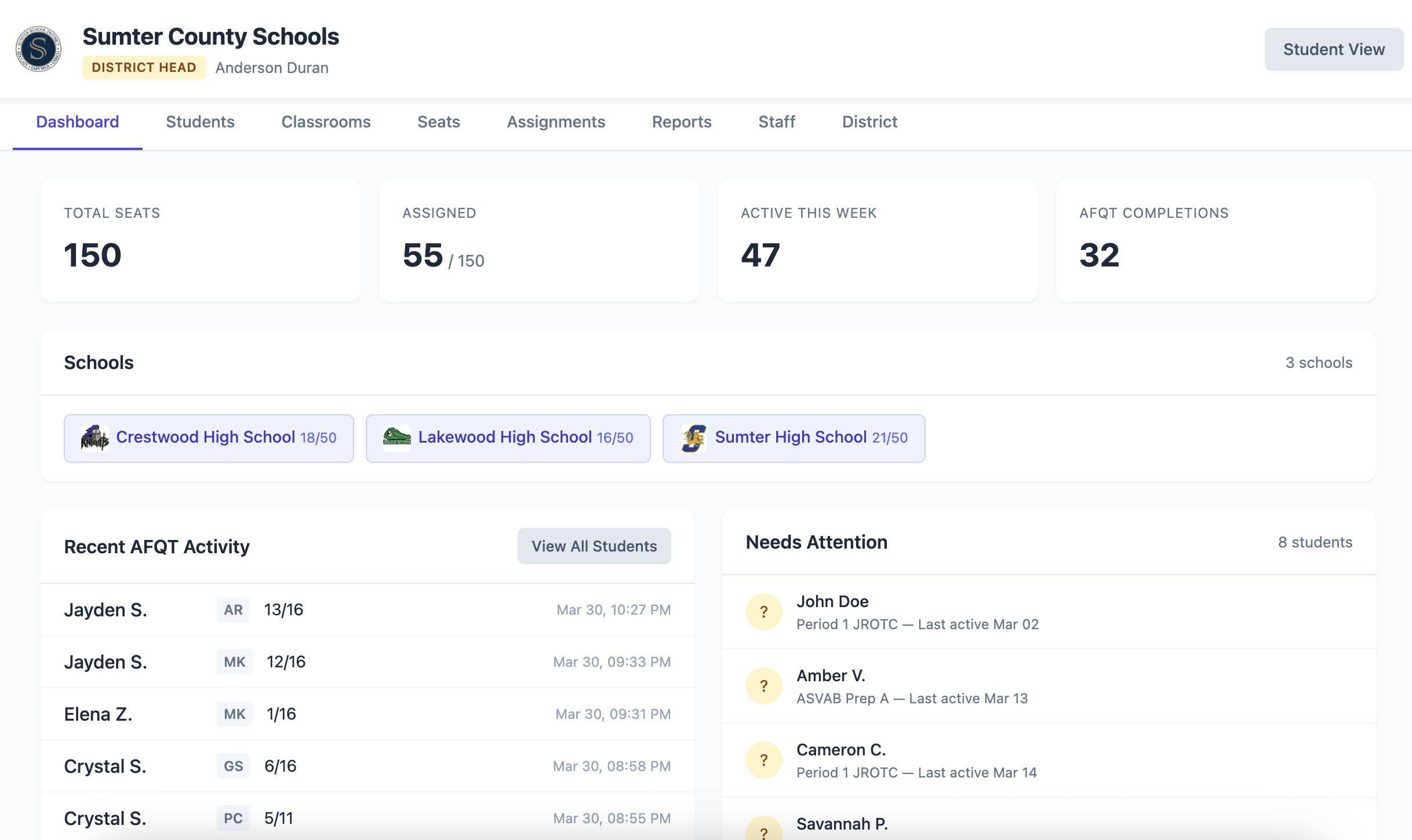
Teacher Dashboard
Dashboard — stat cards, school tags, activity feed, engagement alerts
Student Detail
Individual student — AFQT percentile, bell curve, per-subject scores

See What Students See

Clean, intuitive interface. Students know exactly what to do without being told.
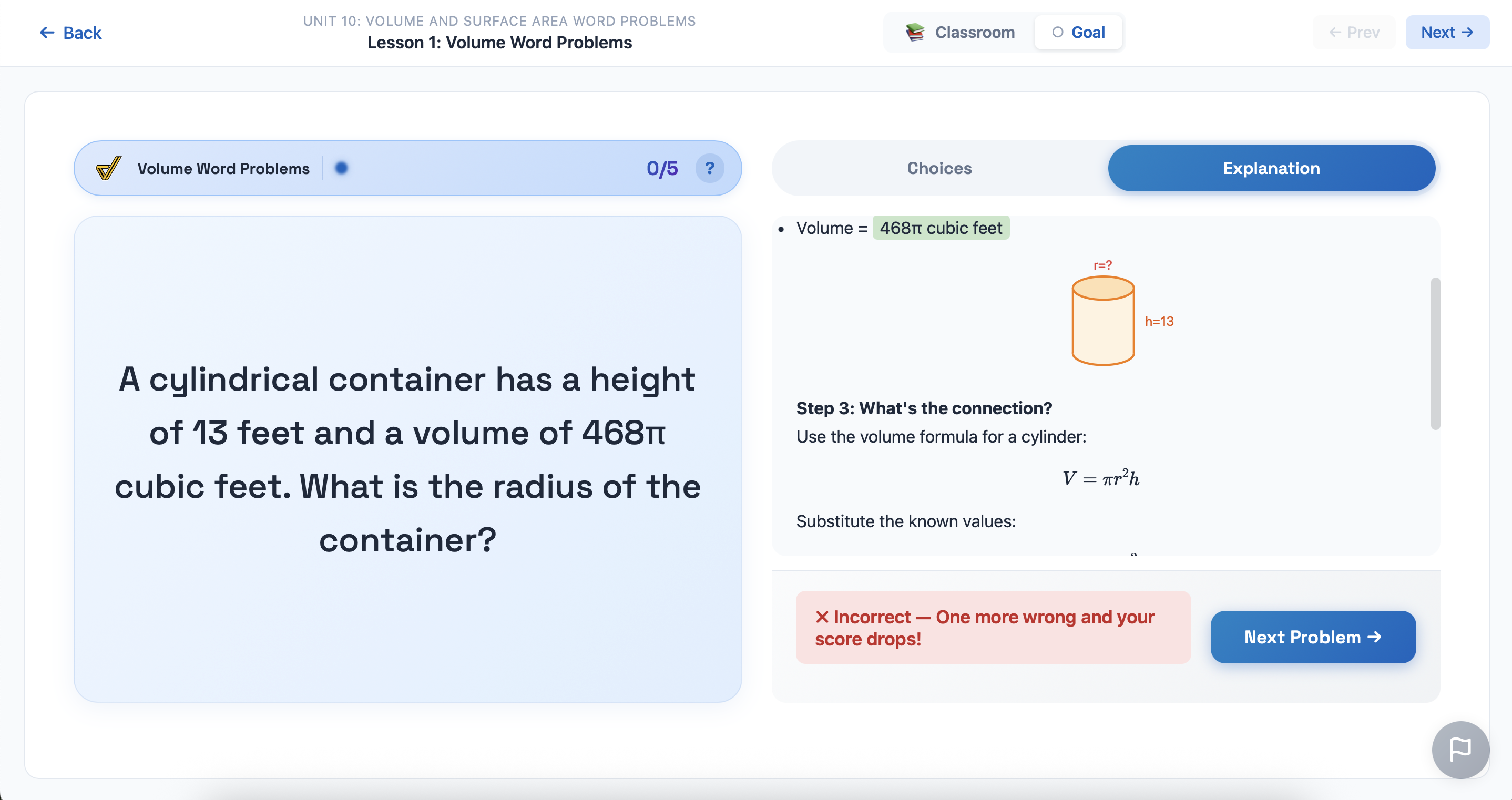
Goal Practice with step-by-step explanation
Goal practice — step-by-step explanations for every problem
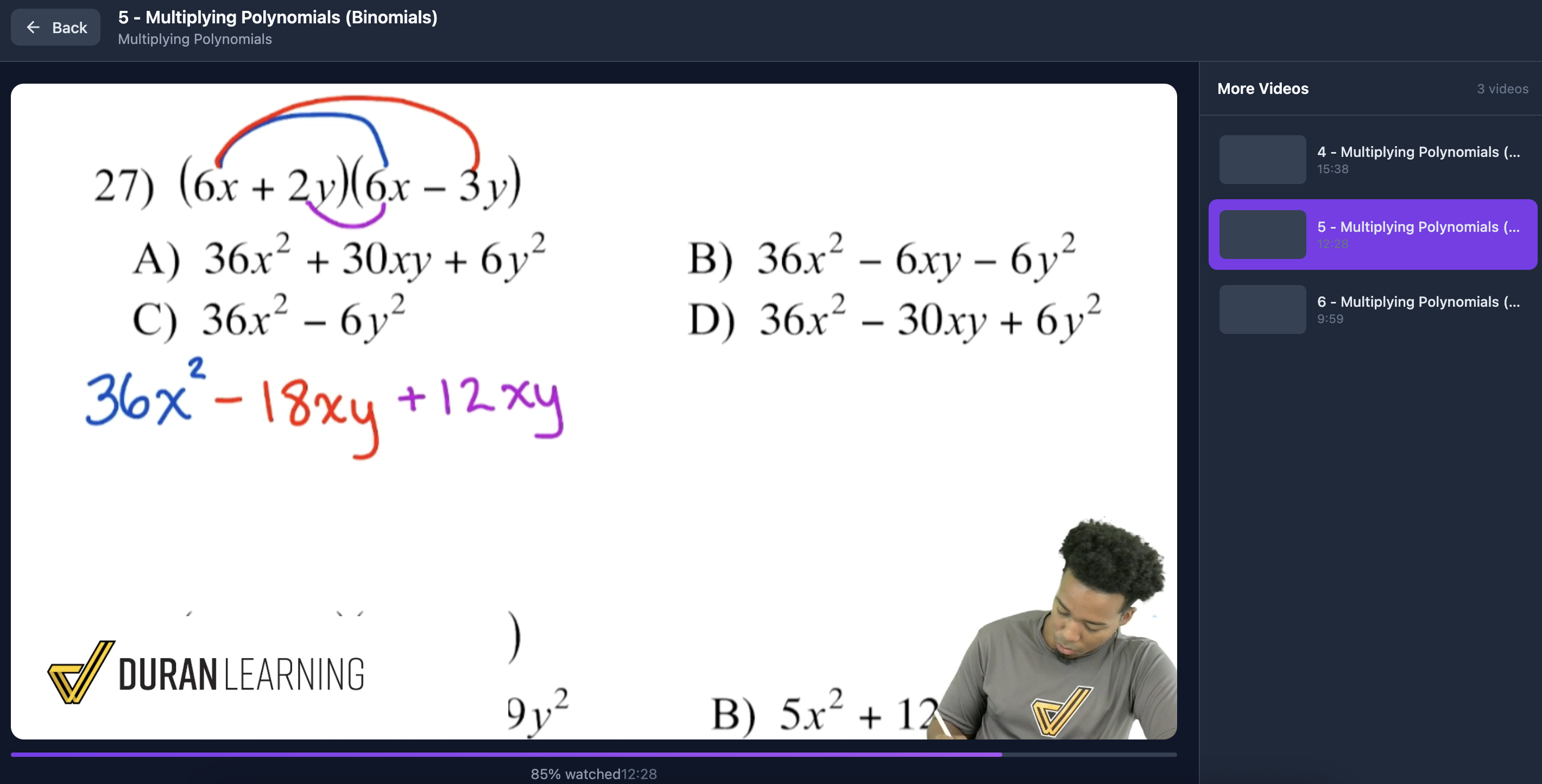
Video solution with Coach Anderson
Video solutions — Coach Anderson walks through every guided practice question

How It Works

From contract to classroom in three steps.

1
We Set Up Your District
We create your district in our system with your school logos and JROTC branch insignias. Your district lead gets an email invitation.
2
Teachers Invite Students
Teachers upload a student roster (CSV or Excel) or add students one at a time. Each student gets an email and activates instantly.
3
Students Practice, Teachers Track
Students work through courses at their own pace. Teachers monitor progress, assign work, and download reports from their dashboard.

6 Complete Courses + AFQT Practice

Covering all 4 AFQT subtests plus General Science and Math Basics.

AFQT
Arithmetic Reasoning
Word problems with video solutions, timed checkpoints, and star ratings.
12 Units 266+ Templates
AFQT
Math Knowledge
Algebra, geometry, and graphing with interactive visual modules.
11 Units 356 Templates
AFQT
Word Knowledge
1,000+ vocabulary words with smart study spaced repetition.
1,000+ Words 4 Categories
AFQT
Paragraph Comprehension
5 question types with strategy lessons and trap answer analysis.
773 Questions 5 Lessons
Bonus
General Science
Biology, chemistry, physics, and earth science practice.
447 Questions 46 Skills
Bonus
Math Basics
Speed drills with bronze/silver/gold medals and leaderboards.
28 Drills 3 Modes
Ready to See Pricing?
Verify your school or district email to build a custom quote with tiered pricing, or send us a message to schedule a demo. One verification unlocks both.
Verified:

Frequently Asked Questions

What's included in the seat license?

Each seat gives one student full access to all 6 digital courses, the AFQT practice test, live classes with Coach Anderson, 500+ class recordings, and direct support. Teachers get full dashboard access to monitor that student's progress.

How long do seats last?

All seats purchased during our end-of-year special are valid through December 31, 2026. Students can use the platform from the day they're enrolled.

Can we split the cost across schools?

Yes. The quote builder lets you add multiple schools with different seat counts. The quote PDF shows a per-school breakdown that can be used for separate purchase orders. Tiered pricing is applied to your total seats — so buying more across the district gets you a better per-seat rate.

How do we become a vendor?

Once you submit a contact form or generate a quote, we begin the vendor application process for your district immediately. We handle all the paperwork.

What data do you collect from students?

We collect first name, last name, and email address to create accounts. All practice data (scores, progress, login history) is visible to the student's assigned teachers and district lead. We do not sell or share student data.

Can teachers assign specific work?

Yes. Teachers can assign any lesson, goal, checkpoint, or practice test from any of the 6 courses or the AFQT. Students get a notification, and the system automatically tracks when they complete it.

Is there a minimum number of seats?

Yes, the minimum is 50 seats per district. This can be split across multiple schools.

Do you offer a demo?

Absolutely. Submit a contact form or email anderson@duranlearning.com and we'll schedule a live walkthrough of both the student experience and the teacher dashboard.

Ready to Get Started?

Build a custom quote in under 2 minutes. Tiered pricing rewards larger enrollments. Offer expires June 5th.

Get a Quote